Today, I will be reviewing the AEG 8000 Series AP81A25ULT Cordless Vacuum Cleaner - Bronze. I needed a new vacuum cleaner since I moved to a new property.
Pros:
Agile in vacuum mode
Decent price
Decent battery
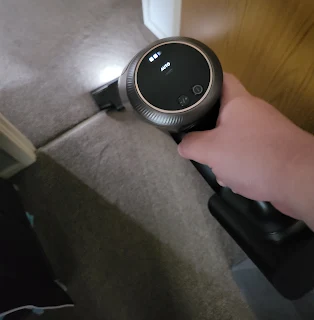
Light at the end to see dark spaces
Cons:
Heavy to use one-handed, and if you're trying to vacuum the ceiling
The trash bin is tricky to open
The AEG 8000 costs £390 from AO.
I was initially considering a Dyson cordless cleaner. I had worked for Curry's before and liked Dyson's lightweight nature. They have a reputation for being one of the best cleaners.
However, the AEG gives Dyson a serious run for the money.
The vacuum picks up dirt quite well. It is agile when vacuuming the floor. However, it is not so comfortable to do one-hand operations for cleaning ceilings and other tight spaces.
Although it seems like a gimmick, it allows me to see when vacuuming in dark spaces.
The interface of the vacuum is pretty simple, too. There are only two buttons. One is to turn it on, and the other is to adjust its suction strength. The battery indicator isn't too granular and can only measure the remaining power to the nearest 30%
The cleaner also has a "tree" to charge and hold all the accessories. This is rather neat and handy for small-house dwellers.
However, releasing and reinstalling the vacuum cleaner's bin can be a bit tricky. In addition, you have to touch the dust a bit when removing the filter "cap" for the bin.
Overall, the device is a good one at a decent price. Its pros greatly outweigh its cons.
Faux leather/silicon wrist strap (if that's your style)
Activity tracker
An extremely readable secondary display
Cons:
Short wrist strap
The vibration motor is meh
Protruding side buttons
Leather wrist strap
Proprietary charger
LTE version locked to Vodafone
TicWatch Pro 3 Ultra... that's quite a mouthful. It seems the company is just tacking on words to the name. It reminds me of this video by Mrwhosetheboss.
But I digress. If you have the TicWatch Pro 3, the Ultra version is more or less the same as the TicWatch Pro 3. Unlike the Pro 3, the Ultra has an internal compass. They both have great battery life. In fact, no watch to date beat Mobvoi's Pro 3 and Pro 3 Ultra in terms of battery longevity.
Style
The TicWatch Pro 3 Ultra LTE has a dual-screen display. The second low battery secondary display reminds me of the Casio non-smartwatches.
Unlike the non-Ultra version ie TicWatch Pro 3, the TicWatch Pro 3 Ultra's Secondary display can change colors. However, that setting isn't in the main watch settings and is controlled by the Essential mode app.
To change the color:
Open the Essential Mode app (using its launcher icon)
Swipe left for settings
Scroll down until you get the option for backlight color
If you want to boost the brightness of the screen, you can double-click the top page button.
The LTE version is made of faux leather/silicon hybrid. Although it looks more stylish than the non-Ultra or non-LTE version, the leather band has a few caveats.
After about two weeks of wearing, it suffered some stress on the bands, causing marks around the holes.
Also, I find the buttons a bit protruding and uncomfortable under certain conditions. The bezels on the watch are also large, making the watch a bit bulky. However, unlike the Samsung Watch 4, the bezels are useless; it does not have a rotating crown. Although the crown on the Samsung may be a bit of a gimmick for some, I use it fairly often, especially when it's raining since the touches may misregister if the screen is wet.
For me, the strap was a bit small.
In fact, out of the three watches I own, the Pro 3 Ultra is one of the smallest circumference bands. However, you can probably get bigger bands aftermarket.
Technology
Activity tracking
As with the TicWatch Pro 3 (and just about most other smartwatches), this watch tracks heart rate, steps, activity, etc. However, it comes with a few added features. It has IHB AFiB Detection and 24 hours stress monitoring.
The step counter was fairly accurate and was about 50 steps off from the Galaxy Watch 4. This is a small margin of error and can be attributed to perhaps me being more dominant on the arm that I wore the Galaxy Watch 4. One good thing about the Mobvoi watch is that it syncs with Google Fit, unlike the Samsung watch. Samsung Watch only syncs with Samsung Health and you need a third-party app like Health Sync. In my experience, it didn't sense the sport that accurately and you have to manually select the sport.
Vibration motor
The vibration motor on this watch isn't that strong compared to the Samsung but it's strong enough.
Synergy with phone
One feature on the Samsung that I miss is the synergy with the phone. The Samsung Watch syncs the do not disturb mode with the Samsung Note 20 Ultra. In addition, with the Samsung, any alarms ringing on the phone also ring on the watch, which is nice. The TicWatch Pro 3 and Pro 3 Ultra, however, lacks this feature.
Google Assistant
Unlike the Samsung watch, the Pro 3 Ultra comes with Google Assistant. However, during my 2 weeks of use, I rarely use the assistant on my watch. Although it supports control of my smart home devices, it does not support routines. When I'm at home, I tend to use my Google Home Hub Max anyway and if I'm on the way, I will use my headphones to trigger the Google assistant from my phone.
4G/LTE
Although my version provided by Mobvoi is the LTE version, it is tied to the Vodafone network. However, there is an unofficial workaround on Reddit. The Samsung Galaxy Watch 4 is slightly more open but I found out only certain networks and certain plans support the esim on the watch. Your watch and your phone must be with the same provider.
In other words, if you want to use the watch to make independent calls, you need to be with a certain network (on your phone) and you have to pay more to support the watch. Last I checked, none of the supported providers support the watch on their PAYG plan. You need to be in with a contract with the network. There isn't a PAYG plan just for the watch.
I miss my Huawei Watch 2 when you can simply pop a sim into the smart watch and use it as a phone.
Battery life
The TicWatch Pro 3 Ultra has no contender in the battery life category. It has extremely long battery life. With its 577 mAh battery and secondary FSTN display, the TicWatch Pro 3 Ultra is the king of battery life. Mobvoi says it would last 72 hours in normal "smart" mode and 45 days in the essential mode. The essential mode only uses the secondary display and allows you to see your steps and battery life along with the time and date.
Wear OS version
The watch comes with Wear OS 2.33. However, no other smartwatch apart from the Samsung Watch 4 comes with Wear OS 3.0, so I'm not going to count this as a con, unlike other review sites. The TicWatch Pro 3 and Pro 3 Ultra are slated to be upgraded to Wear OS 3 later this year.
Chipset: Qualcomm® Snapdragon Wear™ 4100 Platform and Mobvoi dual processor system
Memory:
RAM: 1GB
Onboard storage: 8GB
Display: 1.4“ 454x454 326ppi Full Color Always On Display AMOLED + FSTN
Connectivity:
Bluetooth 5.0
Wi-Fi 802.11b/g/n (Wifi 4)
GNSS: GPS+Beidou+Glonass+Galileo+QZSS
NFC Payments: Google Pay
Additional features:
Speaker
Mic
Vibrator
Barometer
Sensors:
Accelerometer
Gyro Sensor
HD PPG Heart Rate Sensor
SpO2 Sensor
Low Latency Off-Body Sensor
Barometer
Battery capacity: 577mAh
Durability: IP68, Pool Swim/MIL-STD-810G
Conclusion
Mobvoi is a champion with battery life and their dual-display technology is extremely legible even in bright sunlight. TicWatch Pro 3 Ultra continues this trend of excellence in the TicWatch Pro 3. It has a couple of negatives though. The watch is slightly bulky and the wristband is smaller than other watches, including the TicWatch Pro 3. Also, unless you're with Vodafone or plan to switch to Vodafone, don't get the LTE version. The Bluetooth version will suffice and you will save a couple of bucks as well. For a more in-depth review, please see Brian Burriston's excellent review on Notebookcheck.net: https://www.notebookcheck.net/Mobvoi-TicWatch-Pro-3-Ultra-GPS-in-review-Small-update-of-a-good-smartwatch.574006.0.html.
This blog participates in the Amazon affiliate program and if you buy through the links, we may earn an affiliate commission. This does not affect the quality of the review, however.
Today I'm reviewing the Fossil FTW 6078, which currently sells for £255.82 (as of November 22, 2020).
Pros:
Stylish
Fast
Cons:
Battery drain (doesn't last 2 days)
Slips off-hand if moving
Battery
Right off the bat, I would like to say, the battery of the Fossil sucks. If you turn on background HR, you won't last 2 days. At most the battery would last 1.5 days. By the end of Day 1 after charging, the battery remaining was 25%.
My suspicion is confirmed with Fossil replying to my comment asking how big are their batteries. It is only 300 mAH, which lasts up to 24 hours with normal usage
Hi. 300 mAh, 3.88V; up to 24 hours with normal usage.
When the watch reaches low power, the watch suggests switching to watch-only mode, which basically turns the smartwatch into a dumb watch that only shows the time.
The display turns off when not in use.
On the plus size, owing to the small battery size, the watch charges relatively quick. In my experience, it charges to 100% in just like 30 minutes.
Style
There's no denying that the Fossil is stylish, and I think it would be good for formal events as a dress watch. The watch is a bit bulky though but that's expected from smartwatches nowadays.
The turning dial is a nice touch, but I don't find it as useful. Throughout my two-week trial, I barely used the rotating side dial. However, I like the fact that the Fossil has two assignable buttons.
In addition, during my outdoor trials, I find the watch sliding around when I'm in motion.
Connectivity
The watch has the following sensors: " Accelerometer, Altimeter, Ambient Light, Compass, Gyroscope, Off-body IR, PPG Heart Rate, SPO2." That seems to be the standard on most modern smartwatches. The watch uses the "Wellness" app to gather data in addition to Google Fit. The Wellness app, however, doesn't reliably update heart rate to the Google Fit servers. Also, it does not update the SPO2 data to the Google Fit servers. To make matters worse, the Fossil Watch does not have a companion fitness app like Samsung Health, Huawei Health, or Mobvoi Health. With my TicWatch Pro 3, although SPO2 data doesn't upload to Google Fit, I can view it on the Mobvoi Health app, which is a good workaround.
Lifestyle:Always on Display now brighter with more colours. Thousands of watch faces to personalise your look and always see the time. Hundreds of apps from assistant to fitness, payments, music, social, news, games, stop watches, and more. With a 3 ATM design and charging in about half an hour, it’s perfect for all your activities.
Health:Automatically tracks activity goals, steps, sleep, heart rate, cardio level, SPO2 (blood oxygen), and more. Activity modes with GPS keep you on track with your distance and path. Advanced sensors provide the data to power all your health and fitness apps.
Preloaded Apps:Agenda, Alarm, Battery-Optimised Activity Mode, Calendar, Cardio Level Tracking, Cardiogram, Contacts, Enhanced Phone Dialer App, Facer, Google Assistant, Google Fit (Workout, Heart Rate, Goals, Breathe), Google Maps, Google Pay™, Google Play Store, Nike Run Club, Noonlight, Smart Battery Modes, Spotify, Stopwatch, Timer, Translate, Wellness App with Sleep Tracking
Tech Specs
Operating System:Powered with Wear OS by Google
Compatibility:Wear OS by Google works with phones running the latest version of Android™ (excluding Go edition and phones without Google Play Store) or iOS. Supported features may vary between platforms and countries with compatibility subject to change.
Processor:Qualcomm® Snapdragon™ Wear 4100+
Memory:1 GB RAM, 8GB Storage
Display:1.28" Color AMOLED / 416 x 416 / 326ppi
Input:2 Additional Push Buttons (configurable), Rotating Home Button, Touchscreen, Voice
Battery:24 Hr + multi day Extended Mode **Varies based on usage and after updates install**. USB data cable with magnetic dock snaps to split rings on watch caseback and spins 360 degrees for ease of use. Approximately half an hour to reach 80%.
Water Resistance:3 ATM
Watch gallery
Concluding remarks
Personally, I think the watch is more style over function. While stylish, the watch's short battery life is a major handicap.
I'm sure WF100XMF is on everybody's shortlist when they're looking for new earbuds. As of this review, the earbuds cost £249 on Amazon.
Right off the bat, I would say the WF100XMF offers one of the best active noise cancellations and it completely removes transport noises. It also has, on paper one of the longest battery life. However, its software and comfort leave much to be desired.
One thing I don't like about the headphone is that you have to choose the function of the left and right earbud. You can't customize the gesture. By default, it's the right ear control music playback and Google assistant while the left controls noise cancellation levels and pass-through mode. As you notice, this means if you want to adjust the volume, you have to change one of the default configurations. If you switch the left ear's shortcuts, you lose the ability to turn off noise cancellation on demand and the ability to have a pass-through mode (hold to turn off noise cancellation and turn down media volume).
This is somewhat mitigated by the speak to chat mode, which detects your voice and kills media audio, and turns off noise cancellation. You can also set it up so that the app detects your location and turn off noise canceling when you arrive at that location. The app can also detect the movement and set the headphone into "sitting, walking, running, or commuting" mode. However, if you're on the bus, it will occasionally return to sitting mode when the bus pulls into a bus stop. This can be a bit distracting if you have set up sitting mode to have noise cancellation turned off. The GPS mode switch is a bit glitchy at times as it detected that I'm at a place a good few distances from my place. For example, I have set up the headphone to turn off noise cancellation when I'm at the local bus station but it detects that I'm at the bus stop when I'm at the other side of the city, 0.3 miles from the bus station. The chat to talk can be a bit sensitive also. It thinks I'm talking when I'm just coughing.
This headphone comes with native Google Assitant.
However, this Google assistant is unavailable unless you assign a "playback" shortcut to one of the two earbuds. This feature is nothing to sing and dance about. it's just as good as the Google Assistant on your phone.
That said, the audio of the headphone sounds OK. It doesn't have that deep bass but the music comes in nice and clear. You can customize the sound using the inbuilt equalizer. The foam head tip does its job keeping outside noise out.
Now we come with my biggest complaint about the headphone. Comfort. For me, the headphone is a bit uncomfortable. The hard flat part of the headphone causes pain in my ear as I move my head around. Only completely removing the headset from my ear removes this pain. Also, I found out that the foam tip comes off the headphones and remains in the ear! Not exactly great when you're nowhere near a first aid kit. I have this happen once when I was in town and to my chagrin, nobody in town had a tweezer in their first aid kit.
Powered by 5 AAA batteries (Weather Station: 3 x AAA/LR03 Batteries / Wireless Sensor: 2 x AAA/LR03 Batteries)
No way to "expand" the weather station by adding more remote sensors.
The device is a neat way to measure the humidity and temperature in the room. The device also tells the time and the date.
However, the writings are hard to see under bright light as seen below.
In addition, the clock is displayed in such a small font that it's hard to spot from afar.
Although there is lighting that helps see the letters better, the light doesn't stay on. It's probably for the better since the unit is battery powered and the light remaining on all the time would drain the battery. However, I would like it to be lit so that I can read the clock better.
The remote unit allows you to get the temperature and humidity from different parts of the house.
The manual says the device can support 3 channels so up to 3 remote sensors.
Allow auto-pause of the video when you take out the earbuds
Aware mode
Cons
Stuttering
Not a lot of bass
Audio sounds flat
The Jabra 75T is an OK headphone but not worth the price. The headphone is quite comfortable in the ear and you don’t notice that it’s in place.
Another feature that I like is that it allows you to hear your environment. With a tap on the ear bud you pass the sound from your environment. So if you’re walking on the go, this can be used for safety as it allows you to hear the surrounding.
Long battery life, USB C charging, and IP55 waterproofing is a plus.
However, its biggest let down is when it comes to the audio quality, the one thing you expect from a £169 headphone. The audio sounds a bit flat, something common on cheap headphones. Bass and treble is sorely lacking.
In summary, is it the worst headphone? No. But I don’t think it’s worth the current selling price.
To use a USB Webcam with Google Chromebook, you first have to enable it. Go to settings and then search for "camera." Click on "Site settings" as shown. You can also get there by going to chrome://settings/content#content or chrome://settings/content/camera (direct link).
Then scroll down to find "Camera."
Change from "Integrated webcam" or "front camera user-facing" to the Webcam you're using. In my case, it's the Logitech C920, which is labeled as "HD Pro Webcam C920."
I recently finished working for a major UK retail company and though they want to present themselves as a knowledgable source of information, I can tell you, there are lots of bullshitting going on. The adage "jack of all trades, master of none" is especially true.
Many times the assistant simply read off information from the tablet. In addition, a couple of times I have overheard information that is either misleading or plain wrong. For example, I overheard someone say that QLED means the TV has a full backlit display whereas LCDs are lit from the side. While technically true, since QLEDs are often backlit, LCDs can also be backlit. QLED refer to the quantum dots that Samsung uses for a "purer" light source.
Another example is that a manager said a fast read and write times for micro SD cards means the SD card can capture faster action. With slower speed, they said that the dash cam cannot capture fast actions. While technically true, I don't think a dashcam with a recommendation of UHS 1 will require a card with UHS3 speed. It would be a bit of overkill.
And don't get me started with the tech. The tills run a Windows 7 and they frequently freeze. Twice I have had a cash register freeze mid-sale. Also, there is a ticket printer that hasn't been working for over 1 month!
Furthermore, managers often push for the sale of mishaps insurance. Sale assistants get 50p for every plan sold. Also, the additional services count against your "measure" and you could be disciplined if you fail to meet your measure. What they don't tell you is that you can get £5-£10 discount on the plan, depending on the colleague or manager.
Moreover, one quirk I found was that some items are cheaper together than separate. For example, you can get Microsoft Office Home & Student (2019) for a lower price if bought with McAfee AntiVirus and their brand name cloud storage. So always ask to check for customer offers.
Another odd thing I found was that the "reviews" you get after a sale of an online order or delivery reflect upon the colleague who sold you the item, not the online team. I think that's a bit unfair if the delivery team did a rubbish job and the customer dings you for it.
I received this product as part of a review program in return for an unbiased review.
Fossil Hybrid HR is an interesting watch. As the name suggests it's a hybrid between the traditional watch and smartwatches. This is done with an e-ink display under the watch's mechanical hands.
With this approach, the watch is able to achieve a really long battery life. In my experience that's about a week or more. I had been using the watch for a week at the time of the review and it's still ticking.
Like Wear OS watches and other smartwatches on the market, these watches are able to receive notifications.
As you can see from the video above, the interface is quite clunky. Navigations are done using the buttons on the side instead of swiping like other smartwatches. Double tapping on the screen turns on the 4 LED embedded in the side of the watch.
The watch contains most of the functions you expect from a smartwatch. It supports heartbeat tracking and sleep tracking. However, there is no way to display a digital clock, so before buying the watch, make sure you're a fan of the mechanical watches with watch hands.
One feature lacking by the watch is the "find your watch" feature. On my Huawei watch, I can use the feature to ring the watch. However, this watch lacks this feature. It merely shows the location of the watch, which is not that useful if you lost the watch in your room.
Now for the watchband. The watch I received is stylized using a metal watchband. This is not ideal for those with chunky hands like mine. It digs into my skin and I am unable to adjust the band of the watch.
I received this product as part of a review program in return for an unbiased review.
Pros:
Long battery life
Comfortable straps
Very light
Attractive design
Accurate tracking
Cons:
No third-party apps
Limited function
Truncated notifications
I've heard so much about the Huawei Watch GT2. But I think it's a bit overhyped.
The watch is quite lite and has a long battery life. I had used it for 2 days continuously and the battery had only dropped 6%. I had a continuous heartbeat turned on.
Despite these pros, the watch leaves much to be desired.
For example, I can't do much from the watch. The music app won't work with Google Play Music, only the mp3 files transferred to the watch. Spotify is out too so as Google Fit.
Also, you can't use the watch to pay using NFC. In fact, most of the settings of the watch must be controlled by the phone; it cannot be used on its own.
While it does a great job at fitness tracking and sleep tracking, it's lacking on other fronts.
In summary, would I recommend the watch? No. At least not at the price point of £200.







 then search for "camera." Click on "Site settings" as shown. You can also get there by going to


