Google tag and zota

Table link to other accounts

Referral links


Translate

Saturday, September 26, 2015

Swansea University Bay Campus and I

This was the article initially touted to appear in The Waterfront, but was rejected. However, I feel that you guys should have a read of what was written. Enjoy!


Swansea University, Bay Campus, your dream home away from home.  With the opening of the Bay Campus, Swansea University will be the closest campus to the beach, beating out Point Loma Nazarene University in California.


Background
A little background never hurts, does it? The Swansea University Bay Campus expansion is a £450 million investment on a 65 acre stretch of land generously donated by BP.  The university aims to capitalize on the University’s connections with international companies such as BP and Rolls-Royce.  The new science campus will initially house the College of Engineering and School of Management.  The new campus will also be the home of ambitious projects projects such as UK’s first Energy Safety Research Institute, and the Institute of Structural Materials, home to the University Technology Centre for Rolls Royce materials testing.  The campus also allowed an additional intake of students in technology and engineering to address the deficit of STEM (science, technology, engineering and mathematics) research in Wales.  The new campus will create significant additional student places principally in Technology and Engineering, addressing a deficiency in STEM research in Wales.


While development work will continue up until 2020, the majority of the works were complete in time for 2015 Freshers.


First impressions

I first heard about the new campus about a month after arriving to the university.  The promotional video released by the uni
to YouTube in January about the new campus was certainly impressive.


The video showcased magnificent buildings and grand halls.  The engine hanging from the ceiling , I think, was a good touch, as it gives the campus a kind of air and space museum vibe to it.


The rising action
As a Year 1 Aerospace Student Representative, in November, some other engineering representatives, Swansea Student Union officials, and I were invited on a tour to the new Campus.  Since it was raining the week before, we were greeted to flooded fields with large pools of water everywhere.  The manager of St. Modwen did her best to assure as that come September all the water would be gone.  Because of the rain, we were only chauffeured around in a minivan around the Campus.


The second trip in February fared a little better, though.  With the sun shining, which is quite rare in Swansea, the wettest city in all of UK, we were allowed more access to the construction site.  The manger led us to a viewing platform overlooking the construction site and I took the below panorama picture.
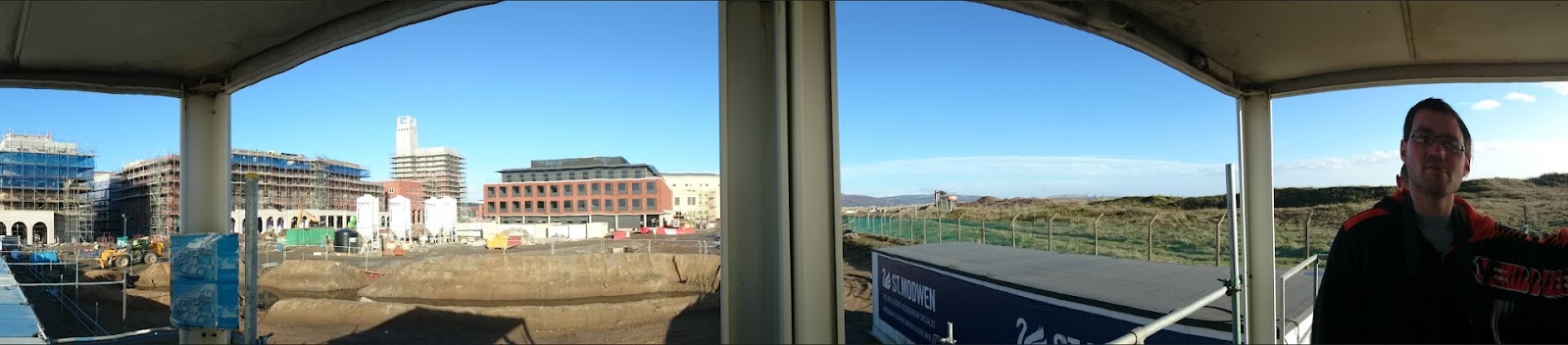

Bay Campus Panorama
Panorama of the Bay Campus under construction.  Featuring Simon Forster, the then College Representative for engineering


The buildings certainly live up to the hype generated by the video.  When the manager pointed out the balconies at the student residential buildings, I imagined midnight ballads of students professing their love to each other.  However, this was bitterly dashed since the manger of the site mentioned that the balconies were merely a decoration and no students were allowed on due to health and safety regulations, which was understandable.


As the months rolled on, the University published even more photos of the new campus, which fueled my growing excitement.


The two pictures featured below was published on the Swansea University Engineering Facebook page over the summer holiday.


D-Day
I have bought all my train tickets for the return journey and nervously, eagerly, awaited for the day I returned to the University.  Then came the day; time to meet the new campus face to face.  All the hype was building up to this.  How much of the discussed features discussed in the student-staff meeting would be implemented?  The tension was building the closer I got to the campus.


While the campus buildings looks stunning, the experiencing wasn’t what I expected.  I felt like living in a “beta-testing campus” where half of the features aren’t completed yet.  None of the shops were ready and there wasn’t a cash point (ATM machine).


In addition, in the library, I spotted a ceiling tile being pushed to one side with the wiring exposed. The onsite Tesco is also closed till October.


That’s not the end of it.  A student I met on Fresher’s Saturday at The Core, a restaurant at Bay Campus, told me that his building Llywelyn Fawr was not completed and he was temporarily placed at the Student Village for a week.  This isn’t good, but luckily he wasn’t coming from far so his mom could help him move his stuffs over.  Imagine an international student arriving to an unfinished building.  This wouldn’t make a good impression on the student.


On the other hand, the lecture rooms looks impressive and modern and the design of the campus is great.


Feedback from other students:
One student said the University library was ‘too small’ and expressed his concern of how it would cope with the influx of students.  Another student expressed his frustration with the bus service.  “The buses are quite infrequent, though, and often a large number of people builds up at the bus stop so not all of them can get on one bus, which means they are waiting a long time for the next one.”  The same student went on to say “The buildings are spaced out so it feels massive. The food in 'The Core' is excellent, good staff, and a nice place to eat.”

A close friend told me, "Library design is very professional interior design, but it's not as functional as it should be because the single seat chairs take too much space in the reading idea."


Another student has this to say: “The campus is very nice, I love the concept it's built around and we are so close to the beach makes it even more amazing!  I just wish they opened up shops a bit faster."


The feedbacks were fairly consistent.  While they all found one or two aspects of the campus to be lacking, when taken as a whole most agreed that the new campus is great.

The new Bay Campus provides “future proofing” and allows Swansea to provide quality education to the much needed field of engineering.  Swansea University is certainly making the right waves at the Bay Campus.

Friday, August 14, 2015

Update: Review: Fallout Shelter on Android

This is an update to my review of Fallout Shelter on iOS.  In that review, I said that the game constantly crashes on my iPad Mini.

When the game came out on Android, I had to give it a try.  I installed the game on my Samsung Galaxy Note 10.1 (N1080) and started it.

The game went through a quick tutorial before letting the player do what they want.  While the experience was better in the sense that it didn't crash, it was not much different from the other resource-based games like Virtual Villagers.  You have to build rooms for the resources (food, electricity, and freshwater).  Achievements are a good way to quickly build up your shelter.

I have also bought the Mr. Handy robot to gather resources when I'm offline.

Fallout Shelter gameplay.  Vault resources are shown along the top of the screen.
A notification appears when a room produces resources.

However, after a day of playing the game, I quickly became bored.  The game requires me to do the same task repeatedly.  To "spice things up," the game occasionally throw monsters at you that you have to defeat.  But it feels like a treadmill.  You'll just keep fighting the same Raiders and Radroaches you fought thirty hours ago, and maybe you'll now kill them 25% faster with all your fancy new gear.

Also, there is no peace in your life if you decide to play the game.  The game frequently prompts you to return to it.  Also, if I'm not on the game, I have a sort of withdrawal symptom where I worry that if I'm not on, my colony would be doom.  At the back of my head, I get the nagging feeling is the raider gone for too long and thus is dead?  Is my colony starving?

In the end, although the game is "better" than the other open-ended resource-based game in the sense in that you don't have to pay to "win" the game, I decided to free myself from the chain and uninstall the game from the tablet.

As Paul Tassi from Fobes.com said in A Warning To New 'Fallout Shelter' Players On Android, "It’s the dumbest kind of addiction ... . I wouldn’t have anyone else do the same before figuring out what a shallow experience the game really is.  One day is enough, and it’s the developer’s fault for not making it any deeper than that."

Tuesday, August 11, 2015

Rant: Samsung and the case of the disappearing MicroSD Card

I have noticed a trend with major smartphone manufacturers to exclude MicroSD card slots from their phones in order to differentiate the different varieties and sell phones of different storage capacities.

What is a MicroSD card?  Well a MicroSD card, such as the one pictured to the right, is a type of storage device that allows you to store pictures, movies, music, etc on it.  Once upon a time, when internal storage was meagre, MicroSD Card was all the rage.  It allowed manufacturers to get away with less internal storage.  However, with smartphones, the apps are typically stored in the phone's internal storage, making the MicroSD card external storage quite useless for the task.

Then came Apple, whose first smartphone, the iPhone, didn't come with external storage.  Instead of allowing expandable storage, they sold their device with varying capacity of storage, where the user have to "predict" the amount of storage they might need in the future and buy the appropriate model.  I have heard too many a tale where iPhone users have "ran out of storage" since their storage needs have grown since they last bought the phone.  Also, each iteration of the iOS operating system that powers Apple's mobile devices (smartphones and tablets) were heavier than the last.  Thus, they ate more of the internal storage, leaving less space for the user.

If the iPhone had external storage, the user could have just bought an external storage card and offload all their photos onto that.  Some may argue, "but wait there's USB OTG (on the go), which allow you to plug in your USB storage device like flash drive."  To that I say, ha!  Would you seriously want to carry a USB pendrive around just in case you want to show your friends photos or playback music that you have "archived" since you no longer use them?

But thank gods that Android phones all come with a MicroSD card slt.  But wait, it seems that the MicroSD card slot is slowly growing missing.  In the mainstream Android market, the Nexus devices were first the one to do away with the slots.  First gen Motorola G and Moto X didn't come with the slots either and neither did the HTC One (M7).  However, those companies found the error in the ways and brought back the slot in later models of the devices.

However, it seems that Samsung, whose phones had always had an MicroSD card slot, is doing away with them.  The S6 and S6 edge device didn't come with the slot, much to my chagrin.  Instead they feature a metallic look that harken to the Apple iPhones.

While I'm not a big fan of the Samsung's physical button and their layout of the back / app switcher is opposite to 99% of non Samsung devices, in the past I was willing to give Samsung phones a go (I had one but swapped it for an Xperia Z2), but without the MicroSD card, it's bye bye Samsung. I am a long time Android user and my first smartphone phone is a Samsung device.  And plus, Samsung did a backward step here with the S6 and S6 Edge. The Samsung S5 had waterproofing whereas the S6 doesn't. On the other hand, Sony has done the opposite. The Xperia M doesn't have waterproofing while the M2 Aqua and all the latest range has waterproofing. In addition, the M4 has a capless waterproofed charger port. That means the only components that are hidden behind the caps are those you rarely touch i.e. the sim card and the MicroSD card slot.  It seems Samsung is trying to mimic Apple and "be cool" with their "redesign" turned out for the worse.

But enough about Samsung, the infamous (or famous depending on how you see it) OnePlus "smartphone killers" don't have the slots either.  OnePlus also relied on a clunky invite system, but that's beside the point.

By now you might be asking why would the company do away with the slots?  There could be a couple of reasons, simplifying of designs.  But the biggest factor is profits.  The MicroSD card stood in the way of storage differentiation.  With the slot present, if you need a larger storage, you could just go to a store and get a larger capacity card.  That means less profits to the smartphone manufacturers (and more to the MicroSD card producers).  Without the slot, the smartphone manufacturers can force user to buy a more expensive phone in anticipation of the storage that the consumer may need as in the consumer's eye, it's better to have more storage than less (and this is true).

So no matter how the company spin it, taking out the MicroSD card slot is an attempt to squeeze more money from the consumers.


Monday, August 10, 2015

Rant: Luxury smart phones

I am appalled with so call "luxury" phones like the Vertu Ti Android Ferrari.  They can fetch of up to $11,999.99, which seems quite a lot for a simple phone.

But what's so great with the phone?  Specs?  Nope.   As seen from the chart below, the specs fall in with other mid range phones, such as the Google Nexus 4, which came out a few months ago.  And the Google Nexus 4 have a cheaper price tag of around £135.00, depending on whether you want it brand new or used.

See comparison here.

Vertu claims to be made in England by a single craftsman who makes each unit by hand (like sculpt it by hand? I'm sure you can't make the battery by hand... or the processor) at the company headquarters in Hampshire. In addition, What sets the Vertu apart from other competitors, other than the titanium and sapphire crystal, is its "live personal assistant on-call" at the press of a button. Vertu's Concierge Services enables the user to call a live person in the same region as the user to do functions, such as booking exclusive hotels and dinner reservations that can easily be done via apps.

Another example is the Bellperre Touch, which like the Vertu, has abmismal specs. According to the website, its specs are:

  • Dimensions: 138.0 x 69.4 x 9.4 mm
  • Weight: 166 g, Micro-SIM
  • 4.9 inch Super AMOLED capacitive touchscreen
  • 48 GB MEMORY + 2 GB RAM
  • 3.5mm jack, NFC, Multitouch
  • GPRS Class 12 (4+1/3+2/2+3/1+4 slots), 32 - 48 kbps
  • EDGE Class 12
  • Speed: HSDPA, 42 Mbps; HSUPA; LTE
  • WLAN: Wi-Fi 802.11 a/b/g/n, dual-band, Wi-Fi Direct
  • DLNA, Wi-Fi hotspot
  • DISPLAY, 720 x 1280 pixels, 16M colors
  • 2G Network: 850 / 900 / 1800 / 1900
  • 3G Network: 850 / 1700 / 1900 / 2100
  • Bluetooth: v4.0, A2DP, EDR
  • Android OS, CPU Dual-core 1.5 GHz
  • MicroUSB v2.0 (MHL), USB On-the-go
  • Autofocus CAMERA 8 MP, 3264 x 2448 pixels, LED flash
  • Simultaneous HD video and image recording
  • 1080p@30fps Video
  • Secondary cam: 1.9 MP, 720p@30fps
  • Accelerometer sensor, gyro, proximity, compass, barometer
  • GPS with A-GPS, GLONASS
  • Active noise cancellation with dedicated mic
  • TV-out (via MHL A/V link)
  • MP4/DivX/XviD/WMV/H.264/H.263 player
  • MP3/WAV/eAAC+/AC3/FLAC player
  • Organizer, Photo/video editor
  • Document editor (Word, Excel, PowerPoint, PDF)
  • Stand-by: (2G) / Up to 330 h (3G)
  • Talk time: (2G) / Up to 14 h (3G)
  • Music play: Up to 48 h

In conclusion, are luxury phones worth it? Definately not. Unless you're looking for a phone for a permanent showcase, they quickly get outdated. And an advice for luxury phone makers, please make your phones specs worth the price. You could maybe stuff your phone with like 4 GB no 8 GB of ram, 128 GB or 1 TB of internal storage with microsd card expansion, and the top of the line custom octo-core (8 cores) processor with a clock speed of 3 GHz or greater.

Monday, July 6, 2015

Rant: Doctor Who's music sounds like the Samsung ringtone "Walk in the Forest"

While watching the Doctor Who prequel trailer for The Name of the Doctor, the music reminded me of the ringtone "Walk in the Forest" on Samsung phones. 

Judge for yourself and see.

The trailer:


The "Walk in the Forest" ringtone from Samsung:

Wednesday, June 17, 2015

Review: iPad Mini


You guys may know that I am a devout Android fan.  However, I won an iPad Mini (1st Gen) from Morgan Graduates and decided to give it a go.

There is a big difference between Android and Apple.  First is the lack of customization.  Second is the specs.  On Android, I could open at least 3 tabs on the Chrome browser, but on the Mini, I could only do 1 or 2 tabs.  Any more and if you change tabs, the tab would have to be reloaded.

Also, iOS doesn't really support multitasking.  If you pull down the notification, whatever app you are using is "frozen" in time.  Another drawback to the iPad Mini is Internet speed.  I feel that the Android Internet is faster despite both devices connected to the same network.  The task switcher is also clunky since you have to double tap on the home button to bring up the cards interface.

Click here for a more in-depth review of the iOS system.

Review: Fallout Shelter on iOS


Fallout Shelter by Bethesda Studios is the hottest new game on the block.  It comes in hot heels of the highly anticipated game Fallout 4 by the same game studio.  The online reviews by Tech sites were all positive, so I decided to try it out.

I was initially impressed that I can progress the game without hitting a paywall.  But that doesn't mean there isn't any micro transactions -- there is.  Real life money could be used to buy packs that can give in game cash, resources, clothes, or weapons.  But it doesn't require the purchase of the stuff and the first two achievements give you two of the packs for free.

Five minutes into the game, I encounter my first problems: crashes.  Fallout Shelter on iPad Mini (1st Gen) crashes randomly.  It soon become more of a "when will it crash" game.  And to make matters worse, whatever you have done before the crash doesn't saves.  For example, if you "rush" -- one of the features of the game where you can get the resources faster -- and you succeed and then the game crash, the rush may not save.  And if you do the action again, there is a high chance it would fail.


The infuriating crashes happen more frequently as the game go on.  In addition, the game require you to have things right on the first go -- no messing up.  In the game you can combine the resource makers into one large plot.  However, once you build a plot, you can't move it around.  And you can only destroy the plot from the end first.  So if you want to change the middle plot, guess what, you have to build the entire row again.  So that sucks.

In the end, the random crashes just made the game too unbearable for me, so I ended up uninstalling the game.


Saturday, May 9, 2015

Update: Updated remarks to the Sims 4 review

Sorry guys for not posting in a long time.  I am really busy with university and all.

This is an update to the blog post Sims 4 is the most boring game there is posted last September.

I have had a chance to play the game on a University loan computer without the game crashing the PC.  And while the pools and ghost updates were a nice addition, many of the points made in the initial post still stands.

Due to the loading screens, I was really hesitated to switch lots.  The "needs" were really annoying and to use cheats enjoy the game.  Without the cheats, the needs constantly interrupt game play.  The cheats I most commonly use are:

TestingCheats True - This will enable an interactive cheat mode. After typingTestingCheats True into the command console, hold the Shift key and then click on objects or Sims to interact with them. It won't work if you aren't holding Shift. Check out the list of actions listed below.
  • Shift + Clicking on a Sim
  • Modify in CAS (Create-a-Sim) - Modify your Sim as you see fit
  • Cheat Need | Make Happy - Sets your Sim's needs to full and mood to happy
  • Cheat Need | Enable Need Decay - Your Sim's Needs will decay
I use the modify sims in CAS cheat to change female sims into male ones for the purpose of getting genetically related babies in lesbian couples.  However, this has the effect of resetting the relationships between the couples.  Although married, they become like strangers.

In addition, after playing for like 3 hours I got bored and uninstalled the game.

Friday, September 5, 2014

Review: Sims 4 is the most boring game there is

I bought the Sims 4 game from Tesco direct and it arrived within 1 day.  I was very enthusiastic about the game since I've heard so much of the Sims 3.

The install went smoothly taking about 5 minutes and I started the game.  When I install the game, EA offered an "upgrade" for £11.99  I went ahead with the purchase.

I created my Sims of my RP character Lucy Tempest.


Lucy and her mom Haven Tempest watching TV


That was when the trouble started.  I found the controls very, very clunky.  It's very hard to find the controls, and I often find myself "searching" for the items in the console.  Also, the camera angle is awkward and it's hard to change the angle.  In addition, I play with two Sims and I can't do anything while one of the Sims is working.  After spending like 2 hour playing the game, I found it a bore.  Each action incur a loading screen and there's nothing to do.  The load screens are also jarring to the point when I dread going to another neighborhood or playing with another family.

And to make matters worse, the PC crashed on me.  The power light of my PC was on, but the screen was blank.  The monitor simply went blank saying it has gone to standby mode.  I restarted the monitor to no avail.  It said no signal from computer.  However, I saw the power light still on!  The only 'fix' is to press the power button to shutdown the PC and turn it back on.

I promptly uninstalled the game and requested a refund from Tesco.  I also requested a refund from EA for the digital content, which I also got.

Tuesday, September 2, 2014

Review: Chrome OS -- Give Chrome OS a try

This post has been updated to take into account recent changes in Chrome OS.  Click here to see the latest post.


Apple vs. Windows?  That's the question we often hear.  Microsoft Windows and Apple Mac OS have dominated the computer industry for a long time and comparison between the two is often a heated debate among computer enthusiasts and fanboys.  The two tech giants are synonymous with modern-day computing.  But there is a contender on the block and its name is Chrome OS.

I have a HP Chromebook with 3G Internet, which I take into classes, as well as a Core i7 Chromebox, which is my main desktop.  And my Windows desktop?  Sitting under my desk collecting dust for 7 months.

What is Chrome OS you might ask?  Well Chrome OS is a brand new operating system built by Google from the ground up with a view toward the web.  If you have used a Chrome browser, you have pretty much used the operating system.  Chrome OS is lightweight and requires very little resources.  Now another question you might be asking right now is what about word processing or my music?  Well, don't fret.  Anything you do on a traditional computer there is an equivalent application on the web.

Word processing?  No problem.  Two solutions are available: Google docs or Microsoft Office online.

Music your thing?  No biggy.  I'm pretty sure most of you are on YouTube anyway.  Plus you can upload your music to Google Play Music online and it will work on any PC.

And as an added bonus, Chrome OS cannot be infected!  It is basically a web browser so there is nothing to infect.  No nasty viruses or spyware.  Also, updates install on the background and simply require a reboot to start.  In addition, Chrome OS takes mere seconds (around 7 in my tests) from pressing the power button to being on the web.

So for hassle-free computing, give Chrome OS a try.

Monday, July 14, 2014

Review: Samsung S5 - the Windows 8 of the Galaxy Range

 Today I received my Samsung S5 and to be blunt, I hated the general interface. It's like Windows 8 of the mobile world.


Samsung had changed things a lot, and not for the better. For example, the volume keys are mapped to take photos rather than the zoom controller of the previous iteration. Then there's the menu section. It's a jumble of settings strewn everywhere.  Also, frustratingly, the phone maps the menu to the left of the menu and the back button to the right. This is the opposite of stock Android. Almost all other phones have it the other way around.  In addition, the location causes me to accidentally mash on the keys when in landscape mode. 

However, the waterproofing is a welcome though. I am also a fan of the multi-window view for Samsung phones.

I like the Sony Xperia Z2, but the battery is it's Achilles heel. When on mobile Internet, even when charging, the phone battery drains rapidly.

Monday, April 28, 2014

Fix it: Bricked computer after installing the AMD Catalyst 14.4 update

After installing the
AMD Catalyst 14.4 update on my HP P6792uk desktop, I found the computer completely bricked.  It won't proceed further than the Windows 7 "flag" bootup animation.  I tried booting to safe mode by bashing "F8" and selecting "safe mode."  However, the computer hangs at ATiPCie64.sys.

I was at wits' end.  With an SAT (Scholastic Aptitude Test) Reasoning coming up, I did not want to do a complete rebuild a computer.  Then I figured a way of bypassing the driver from loading.  Going to the same "F8" menu, I instead selected "Repair PC." That brought up the following screen:


I selected "System Restore" and chose a time before the update.  After a tantalizing wait, I was greeted with the Windows 7 desktop.
 
After the successful restoration of the computer, I reinstalled the AMD Catalyst 13.12 drivers.
 
I did an uninstall through the add / remove program.  And after reboot, I scrubbed the last remaining trace using DriverFusion.  Then I reinstalled the program.

Saturday, November 30, 2013

Fix it: Deleting manufacturer bookmarks

I bought a Sony Xperia SP and when I launched the browser Chrome, I noticed there was a folder named "Sony" that I couldn't delete. Nothing in the browsers could be deleted. And to make matters worse, Chrome keeps defaulted to that folder most of the time I launched it.

I searched Google and I came upon this forum post on the XDA forums. As mentioned in the forum, to disable the folder, go into settings then apps find the app "com.android.providers.partnerbookmarks." Then click "Disable" and then "force stop." You could reboot the phone if necessary.

Thursday, November 7, 2013

Info: Free Norton upgrade within subscription!

Edit: All the links to the latest version of Norton Internet Security (NIS), Norton AntiVirus (NAV), and Norton 360 Standard (N360s) and Norton 360 Premier (N360P) are forward compatible so that the links would download the latest version whenever you visit and I no need to update the links every year.
You may not realize it but starting from 2006, Symantec has allowed all users with a valid subscription of their Norton software to make a FREE upgrade to the latest version (Version 2012 as of the publishing of this post. Just go to http://www.norton.com/nuc to check if you qualify! Alternatively, you can download the direct installer from these URLS. Be sure to download the latest version to the product you already have! For example, Norton Internet Security users cannot upgrade to Norton AntiVirus and vice versa. Also for Norton 360 make sure you check if you have standard or premier (25 GB of online storage) and download the file accordingly!
Unless the previous version is glitching, Symantec recommends an over the top installation. However, I prefer to use the Norton removal tool first (http://www.norton.com/nrt).
  1. Download the required files to upgrade
  2. Download Norton removal tool from http://www.norton.com/nrt
  3. Back up identity safe if you are using it (Norton AntiVirus doesn't have identity safe so they need not to worry).
  4. Disconnect your internet by turning off the router or turning off the wifi switch or removing the cable.
  5. Uninstall the Symantec product through the conventional way (Through add/remove)
  6. Restart
  7. Run the Norton removal tool you downloaded earlier.
  8. Restart
  9. Go to %programdata% and delete the "Norton" and "NortonInstaller." DON'T delete any other files other than those two.

  10. Install the product from the installation file you downloaded in step 1.
  11. Restore identity safe

Fix It: Changing the size of the icons of Internet Explorer 9 and Internet Explorer 10

Update

This hack does NOT work in Internet Explorer 11 (IE11).

Ignore this bit. This is to help people find stuff faster using "ctrl" F. This is just a list of keywords. Size, icon, Internet Explorer 9, bigger, smaller, big, menu.
This "fix it" article will attempt to enlarge the size of the command bar in Internet Explorer 9 and Internet Explorer 10 Unlike Internet Explorer 8, in Internet Explorer 9 and later, there is no easy way to enlarge the icon size.

Is your icon in your version of Internet Explorer 9 as small as in the below screenshot?


 And do you want to make it large again as in the below screenshot?


Well then I have a solution for you, but it ain't pretty.

You would have to manually edit the registry. Open up registry editor by typing in "regedit". Then navigate to HKEY_CURRENT_USER\Software\Microsoft\Internet Explorer\CommandBar. After that right click on SmallIcons and select modify. Change the value from 1 to 0 [don't type in this part ("zero")] to renable large icons. Or else, just download the below file zip and merge the included registry key with your registry. The zip file also contains the registry to make your command bar small again.

The file reads:
Windows Registry Editor Version 5.00

[HKEY_CURRENT_USER\Software\Microsoft\Internet Explorer\CommandBar] "SmallIcons"=dword:00000000
https://docs.google.com/leaf?id=0B1Tan13i1a63Njk2ZGI1NzktNTJhNC00MzU4LTgyZmUtZTAxNTA4ZTYzOTFj&hl=en

In Internet Explorer 8, to make Command bar icons larger follow the below procedures
  1. Right-click the Command bar
  2. Point to Customize
  3. Click Use Large Icons (after clicking there should be a checkmark in front of it)
To make the icons small, follow this procedure and click Use Large Icons again.

Saturday, November 2, 2013

Info: Older The Techy posts

As you probably know -- if you're following me from My Opera -- that Opera has decided to shut down their popular blogging platform MyOpera.  This was met with chagrin from fellow MyOpera bloggers.  I have transferred three of my most interesting MyOpera post to Blogger.com. The transferring process is very tedious so I will not be transferring all of my blog.  Older posts are available here, courtesy of Waybackmachine.

Friday, November 1, 2013

Review: Windows 8

Note: This review is a bit outdated, and I am no longer recommending Windows for the average user.  I think Chrome OS is the better operating system.  Click here for my full review of Chrome OS.


This blog post was posted from a Windows 8 PC! However, it was expanded and edited on a Windows 7 PC.

Windows 8 is released today on October 26, 2012. I went to my local PC World store to test it out. My first impression of it is that it is "different." It marks a radical difference from the Windows we use to know. Starting from Windows 95 up to Windows 7, the basic Windows interface looks pretty much the same: the start menu in the lower right hand corner and the desktop.

Boot up process

With Windows 8, the first thing you would notice upon booting up is that the BIOS splash screen is gone. So as the Windows start up screen. These are now combined into one. Windows 8 start up sound is disabled by default but if you turn it on, it sounds exactly like Windows Vista. Also, it boots up into the Metro Windows Start Menu (or as Windows call it Modern UI) rather tan the desktop. Note: For legal reasons, Microsoft wants users to call the Metro UI as Modern UI. In addition, if you want to go back to the traditional desktop, you have to click the desktop icon on the Modern Start Menu. That will throw you to the desktop, which feels like an app since it too can be closed by dragging downwards. There isn't any way to bypass the start menu and boot straight into Windows (well there are many ways but they are merely hacks as they're not "official" i.e. not supported natively)


Windows 8: A tale of two interfaces

Windows 8 feels bolted on. Settings made in the Windows 8 metro screen does not necessarily translate to the desktop app and vice versa. There are different settings for metro app. For example, when I log out of Chrome on the desktop app, it still signs me in in the Modern UI Chrome app. Also, I can't delete users from Chrome app.

I feel Windows is designed for touch as I find it easier to browse Windows 8 on a touch PC than with a mouse and keyboard. For example, with the Internet Explorer Modern UI app, to bring up the URL bar after it disappear, on a touch PC, you just swipe downwards. However, with a mouse and keyboard, I spent about 10 minutes doing various actions. I even consulted the PCWorld sales guys and he doesn't know. In the end of random clicking, I found that right clicking on a blank space in the app brings up the start menu. Another example is that to close Modern UI apps, you will have to click on the top and drag it downwards or press "alt+f4". I also do not like all the sideways scrolling that is involved in Windows 8.

Another chagrin I have with Windows 8 is that stuffs are thrown all over the place and it's hard to find it. Also, searching for the stuff is also one step longer Windows 8 search does not search files. There is an extra step to choose that. In Windows 7 to find the option to delete Internet Explorer history, I have to click on start and then type in "delete"--> Start --> Delete to find the option to delete IE histories.


In Windows 8, it's right hand corner (or lower right hand corner or the start button on your keyboard) --> Search. Then type in "delete" and select settings and then you will find the option to delete the history.Win8 Start --> Select Settings --> Delete

Step 1:


 Step 2:
 
Windows Explorer (or in Windows 8 lingo File Explorer) now sports a new ribbon UI. This interface was first introduced in Microsoft Office 2007. Gone are the menus. File Explorer with Ribbon showing:


File Explorer with Ribbon hidden (default):


I find this irritating since file options are hard to find. In Windows 7 it's tools --> Folder options:


 However, in Windows 8 it's View --> Folder options


In the desktop settings, Aerosnap to view two windows side by side still work.


The option to switch apps remains as alt+tab. It can be used to switch between desktop and metro apps.

Windows 8 task switcher:


Windows 8 task switcher with metro apps and desktop programs running:


Windows 7 task switcher:


However, aero switcher no longer present. Just in case you guys don't know what that is, this is aeroswitcher in Windows 7:


Pressing that combo brings up this screen:


 Windows in Windows 8 feels flatter and more "digital looking." Unlike Windows 7, which sports a glossy look, the Windows 8 windows feels flat and bland. Here are the two Explorer windows shown side by side with the Windows 7 window on the left and the Windows 8 window on the right. Click on the image for the full view.


As well as a new Explorer window, Windows 8 feature a revamped task manager, which is certainly better than Windows 7's as shown.


Creating a program shortcut is a pain in the arse. To do that, right-click the app. A menu will open at the bottom listing the options available for the app/program. Click on the 'Open File Location' button. You'll be kicked out to Windows Explorer to the folder containing the app, and it will be highlighted for you. Right-click on it and select "Send To->Desktop (Create Shortcut)". You will now have a Desktop shortcut for your app!

Final remarks

Windows 8 feels faster and slicker, although I did manage to "freeze" an Internet Explorer window on the store PC (I think I broke it cause every time I bring up Internet Explorer, it freezes). However, it feels more touch orientated. Doing things on Windows 8 is a series of just trial and error. Files and settings are thrown all over the place and there is a steep learning curve. The user have to click various things before, a ha! I found it. Also, the upper right hand corner or lower right hand corner is the new start menu. Ther isn't any "visual" cue with Windows 8 unlike earlier windows. It's all hover and out pops the Window. Oh here's some advice of how to turn off Windows: to turn off, upper right corner, power, turn off. Or go to desktop and press alt+f4.

Note

I'm using Google Chrome rather than the native Internet Explorer since it's easier to simply junk all the settings after I use it. I feel it's more "portable" as I can easily sync all my settings to it and delete it in one go after I'm done. Also, it has Adobe Flash Player bundled so no need to worry about the outdated Flash Player. In addition, it doesn't need admin privileges to install.

Hardware Requirements

Minimum hardware requirements for Windows 8
Criteria Minimum Recommended
Processor 1 GHz clock rate
IA-32 or x64 architecture
Support for PAE, NX and SSE2
x64 architecture
Second Level Address Translation (SLAT) support
Memory (RAM) IA-32 edition: 1 GB
x64 edition: 2 GB
4 GB
Graphics Card DirectX 9 graphics device
WDDM 1.0 or higher driver
DirectX 10 graphics device
Display screen 1024×768 pixels 1366×768 pixels
Input device Keyboard and mouse A multi-touch display screen
Hard disk space IA-32 edition: 16 GB
x64 edition: 20 GB
Other USB 3.0 port
UEFI v2.3.1 Errata B with Microsoft Windows Certification Authority in its database
Trusted Platform Module (TPM)
Internet connectivity

Useful links:


Fix it: Hijack of the "default" page on stock Android browser


After installing some Android apps, you may notice that the "default" home page has been changed to www.searchmobileonline.com or the likes. To get rid of the "default" home page, perform the steps below.

  1. Open Settings > Applications > Manage applications > All (tab on top) or Settings > Application manager as shown
  2. Go to the "All" tab on the top and scroll down to "Internet"
  3. Click "clear data" in the resulting window
Credits for the instructions go to Getting rid of "search mobile online" browser hijack in Android.